On this page
- Why phone voiceovers sound bad (and it's not the mic)
- How to record Urdu voiceover on phone: start with the room
- Set up your phone before you record
- How far to hold the phone from your mouth
- Write and read the script so it sounds natural
- Record, then check before you leave the room
- Edit: trim, clean and level for free
- Captions for Urdu: what works and what we couldn't verify
- A 20-minute recording routine you can repeat
- What to record about next
- FAQ
Quick answer: To record a clean Urdu voiceover on your phone, sit inside or beside a wardrobe full of clothes, or under a razai, switch off the ceiling fan and UPS, put the phone on airplane mode, and hold it one hand-span (about 15 cm) from your mouth, slightly to the side. Record in Voice Memos or your phone's recorder at the highest quality, read in short phrases, trim and level the file, then type your own captions.
If you've searched how to record Urdu voiceover on phone, you've probably found Fiverr gigs and English guides written for people with a quiet flat in London. Neither helps when the fan is on, the UPS is humming, a rickshaw is passing outside and the azan starts in ten minutes.
This guide is for that house: where to record, how far to hold the phone, which settings to change, how to read an Urdu or Roman Urdu script, how to clean the file for free, and which captions work for Urdu. No microphone needed. A phone mic is good enough for TikTok narration; what ruins phone audio is almost always the room.
Why phone voiceovers sound bad (and it's not the mic)
A bad home voiceover usually has one of three problems. Echo: your voice bounces off bare walls and tiled or marble floors, giving that hollow bathroom sound. Hum: the fan, UPS, a neighbour's generator or the fridge, which your ears tune out and the phone doesn't. Distance changes: you lean in and out to read the script, so volume and tone jump around.
Shure, the microphone maker, says in its guide to recording vocals that upgrading gear won't fix a reflective room, and that the cheap fix is a duvet or thick blanket hung behind the speaker. You already own the duvet.
How to record Urdu voiceover on phone: start with the room
Walk through your home and clap once in each room. Where the clap dies fast, record. Where it rings, skip.
The best spots, in order
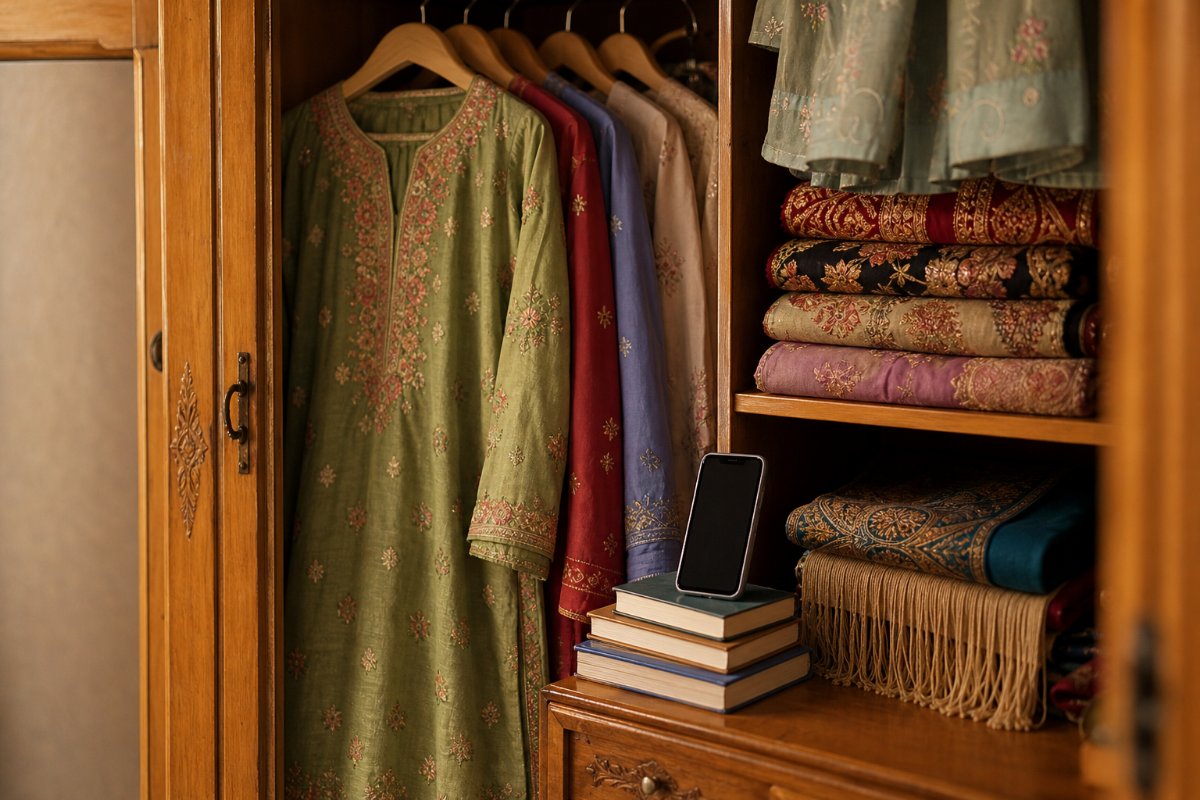
- Inside an open almari full of clothes. Face into the hanging clothes with the phone between you and them. It's the best free booth in most homes.
- Under a razai or thick blanket. Throw it over your head and the phone, leaving a gap for air. It looks silly and works. Keep takes short in summer.
- A bedroom with curtains, a carpet and a full bed. Close the curtains, face the softest wall, and put a folded blanket on a tiled floor.
Avoid the drawing room, kitchen, bathroom and stairwell. They sound like a water tank.
Kill the noise before you press record
Do this every time, because you'll forget once and lose a good take:
- Ceiling fan off. Yes, even in June. Record in short bursts and switch it back on between takes.
- UPS, inverter and generator. A charging UPS often buzzes. If your area has a load-shedding schedule, record when the power is steady and the UPS has finished charging, and wait out the neighbour's generator.
- Fridge, AC and water motor. Switch off what you safely can for ten minutes, or record in the room farthest from them.
- Street noise. Hawkers, school vans, rickshaws and wedding bands come and go. Listen to your street for a day and note its quiet hours.
- Azan. Don't fight it. Use it as your natural break. Plan sessions between prayer times, and when it starts, stop, drink water and rehearse the next lines silently.
Tell the family you need ten quiet minutes ("10 minute recording, please TV band").
Set up your phone before you record
Airplane mode and Do Not Disturb
Turn on airplane mode, or at least Do Not Disturb. A call or a notification sound in the middle of a perfect take is the most annoying way to lose it, and a vibrating phone shakes the mic too. On iPhone there's one more reason: Apple's Voice Memos guide says that if another app starts playing audio, Voice Memos stops recording.
iPhone: Voice Memos settings
Use the built-in Voice Memos app. Apple's guide (iOS 27 version, checked 19 Nov 2026) describes two settings that matter for a voiceover:
- Mic mode. While recording, open Control Center, tap Voice Memos and choose Voice Isolation to filter out background sounds. Wide Spectrum keeps them in. For narration you want Voice Isolation. Apple notes these mic modes aren't available on every model.
- Recording mode. In Settings, then Apps, then Voice Memos, you can choose Mono, Stereo or Spatial Audio. For a single voice, mono is the simplest file to edit and it's all you need.
You can also pause and resume to record in parts, which is useful when the azan or a doorbell interrupts.
Android: Samsung Voice Recorder and others
Android recorder apps differ by brand. On Samsung, the official Voice Recorder help page (updated 12 Nov 2026) shows the path: tap the three dots, then Settings, then Recording quality, and choose Low, Mid or High. Pick High. Higher quality files take more storage, which doesn't matter for a one-minute narration.
Samsung also has Standard and Interview modes. Use Standard for a voiceover. Interview mode is built for two people at the top and bottom of the phone.
On other Android phones, look for a quality option in the built-in recorder's settings and pick the highest. Don't hunt for a "studio" app on day one.
Should you record straight into TikTok?
You can. TikTok's editing help page shows the path: on the editing screen, tap Voice on the side panel, tap Record, record your voiceover, tap Done, then Save.
We'd still record in the phone's recorder app first: you get a separate file you can trim, reuse elsewhere and keep as a backup if a draft crashes.
How far to hold the phone from your mouth
Here's the rule we use: one hand-span away, slightly to the side, and the same distance for the whole take.
That's roughly 15 to 20 cm. Shure suggests starting about 10 to 20 cm from a microphone and keeping it steady, because moving closer adds bass (the proximity effect) and moving around changes tone and level. Samsung's page says about 8 cm for speech-to-text dictation; treat that as the closest you'd go.
- Find your mic. On most phones the main mic is a tiny hole on the bottom edge. Point that edge toward your mouth and keep your palm off it.
- Talk across it, not into it. "P", "b" and "ph" push air, and Urdu is full of them ("pehla", "bilkul", "phir", "bhai"). Angling the phone to the side stops the pops; a thin sock over the bottom helps too.
- Don't hold it if you can avoid it. Rest it on books or a pillow. Hands rustle, and a table you lean on sends vibrations straight into the mic.
- Keep the script at eye level. Looking down at a second phone moves your mouth off the mic. Tape the script to the almari door.
Write and read the script so it sounds natural
A clean recording of a stiff script is still a stiff voiceover. Write for ears, not eyes.
Write for speaking
Short sentences, one idea per line, voice-note words, not newspaper words. "Ye trick 2 minute mein kaam karti hai" beats "Is tareeqay ki madad se aap kam waqt mein nataij hasil kar sakte hain".
Write numbers the way you'll say them. If you'll say "dhai sau rupay", write that, not "Rs. 250", so you don't trip mid-sentence.
Mark your breaths: a slash (/) where you pause, a double slash (//) where the video cuts. This one habit fixes most rushed takes.
If you need a structure, our 60-second TikTok script template gives you timed sections, and the Urdu and Roman Urdu hook examples cover the first three seconds, which is the part people re-record most. You can also draft the script in Breakoutly Studio, which writes scripts and hooks in Urdu, Roman Urdu, English and other languages, then rewrite it in your own voice before you record.
Urdu script or Roman Urdu for reading?
Read from whichever script you read fastest without stumbling. For many younger creators that's Roman Urdu, because that's how they text. If you read Urdu daily, the Urdu script will feel more natural.
Two Roman Urdu traps:
- Ambiguous spellings. "Kar" and "kaar", "ghar" and "gar". Spell words the way you pronounce them, even if it's not "correct", so your eyes don't hesitate.
- English words inside Urdu. Decide before you record how you'll say "subscribe", "follow" or "product". Switching pronunciation between takes is easy to hear.
Read in phrases, not in one go
Read one or two lines, pause for a second, then read the next. Silent gaps are easy to cut; mid-sentence stumbles aren't. When you fluff a line, wait two seconds and repeat the whole sentence. Patching half a sentence never sounds right.
Stand up if you can, smile on the hook line, and drink plain water before you start, not chai. Do two full takes: the second is usually better because you've stopped worrying about the words.
Record, then check before you leave the room
Record ten seconds of room "silence" first, so you can hear what's in the background. Then, before you pack up, put on earphones and listen to the first 20 seconds. Phone speakers hide hum and echo; earphones don't. Listen for fan or UPS hum, an echo tail after sentences, pops on "p" and "b", and lines that jump in volume. Fix it now while the setup is in place, because a retake tomorrow in a different spot won't match.
Edit: trim, clean and level for free
You don't need paid software. Any editor you already use for short videos will do.
- Trim the dead air. Cut the silence at the start and end. Shorten long pauses but keep a breath between sentences.
- Cut the fluffed takes. Keep the clean repeat of each sentence.
- Reduce noise gently. Use your editor's noise reduction or "enhance voice" option on a low setting. Too much sounds metallic; if you need full strength, re-record in a better spot.
- Level it. Turn the voice up until the loudest words come near the top of the meter without hitting the red.
- Lower the music. Keep background music well under your voice. People watch on buses and with the TV on.
Listen once on earphones and once on the phone speaker before you export.
Matching voice to video
For step-by-step videos, cut the visuals first and read while watching them so your words land on the right shots. For B-roll formats, record first and cut to the voice.
If you run a faceless account, your voice is the thing that makes the video yours. Our guide on TikTok's unoriginal content rules for faceless accounts explains why adding your own narration to footage matters, and faceless TikTok niches in Pakistan lists niches where a voice-led format works well.
Captions for Urdu: what works and what we couldn't verify
Captions help anyone scrolling with the sound low. Here's where things get honest.
TikTok auto-captions
TikTok's accessibility help page says auto-generated captions use speech recognition. You choose the language on the post screen: tap More options, then Select video language. You can edit or remove the captions after posting. TikTok also offers creator captions, which you turn on from the Captions button on the preview screen and can edit line by line before posting.
What the page does not do is list which languages are supported. As of November 2026 we could not find an official TikTok list that includes Urdu. So check your own app: open Select video language and see if Urdu appears. If it doesn't, or if the result is full of errors, write captions yourself.
CapCut and phone recorders
CapCut's auto-captions help page (24 Mar 2026) says captions depend on the language you select and fail when audio is unclear or noisy. Neither that page nor CapCut's caption tool page lists Urdu, so we can't confirm Urdu support there either. The Google Pixel Recorder's transcription language list includes Hindi but not Urdu.
Our recommendation: type your own captions
For a short video, typing captions takes about as long as fixing bad auto-captions. Paste your script into TikTok's text tool or your editor, split it into short lines and time each to your voice.
Which script should the captions use? Match your audience, not your reading habit:
- Roman Urdu is how many Pakistani viewers type their own comments, it reads left to right like English, and it mixes cleanly with English words. Good default for lifestyle, food, tech and comedy.
- Urdu script looks more serious and suits poetry, religious content, news and an older audience. Check that the font your editor uses actually renders Urdu letters joined correctly before you post. If letters appear broken or reversed, switch fonts or use Roman Urdu.
- Keep it short. Five to eight words per caption line. Phone screens are narrow, and Urdu script lines with long words wrap badly.
Look at your own comments section. If people reply in Roman Urdu, caption in Roman Urdu. Our list of TikTok content ideas in Roman Urdu shows how that style reads on screen.
A 20-minute recording routine you can repeat
| Step | Time | What you do |
|---|---|---|
| 1 | 4 min | Fan, UPS and TV off, airplane mode on, set up in the almari with the phone on books. |
| 2 | 3 min | Read the script aloud once and fix any line you trip on. |
| 3 | 6 min | Record room silence, then two takes, phrase by phrase. |
| 4 | 2 min | Earphone check of the first 20 seconds. |
| 5 | 5 min | Trim, gentle noise reduction, level, export. |
Repeat it every time and your voice sounds the same across your account.
What to record about next
A clean voice won't save a topic nobody wants. In Breakoutly Discover you can search a topic, filter by language, and see each video's outlier multiplier: its views divided by the creator's median views, with the formula and freshness shown on every number. Save the ones you want to remake in your own words to Saved, then write your version.
If you're just starting, our plan for growing a new TikTok account in Pakistan shows how often to post while you build this habit.
FAQ
Can I record a good voiceover with just my phone?
Yes. A modern phone mic is good enough for TikTok and Reels narration if the room is quiet and soft. Record inside a wardrobe of clothes or under a blanket, switch off the fan and UPS, hold the phone about 15 cm from your mouth, slightly to the side, and record at the highest quality setting. The room matters far more than buying a mic.
How far should I hold my phone when recording a voiceover?
About one hand-span, roughly 15 to 20 cm, with the mic edge pointing at your mouth and angled slightly to the side. Shure suggests starting 10 to 20 cm from a microphone and keeping the distance steady. Too close adds pops and bass; too far adds echo.
Does TikTok auto-caption support Urdu?
We couldn't confirm it. TikTok's help page says you choose the caption language under Select video language, but it doesn't publish a language list, and we found no official page listing Urdu as of November 2026. Check that menu in your own app. If Urdu isn't there or the captions are wrong, type your own in Roman Urdu or Urdu script.
Should my captions be in Urdu script or Roman Urdu?
Use the script your audience writes in. Roman Urdu suits many Pakistani TikTok audiences because it's how lots of viewers type, and it mixes easily with English. Urdu script fits poetry, religious, news and older audiences. Whichever you pick, keep lines to about five to eight words and check that the font shows Urdu letters joined correctly.
How do I remove fan or UPS noise from a voiceover?
Prevent it first: switch the fan and UPS off while recording and do takes in short bursts. Afterwards, use your editor's noise reduction or voice enhance option on a low setting. Heavy noise reduction makes voices sound metallic, so if you need it at full strength, re-record in a quieter, softer spot instead.
By Breakoutly Research
Breakoutly researches short-form video for creators outside the US. Every article cites its sources and is checked by a person before it goes live.